Tips for Finding XSS Vulnerabilities
It’s been two years since I last posted on this blog, and I’m reactivating it to share some knowledge that might be useful. I won’t go into detail about Cross-Site Scripting (XSS) or payloads; instead, I’ll show you how I’ve expanded my XSS search area.
Get to know the website
The first thing I do when I start hunting for XSS attacks is to familiarize myself with the website being tested. This means identifying data entry points such as product search engines, post search engines, FAQs—any search engine I can find. I also check for fields for adding comments, reviews, notes, titles, and other input data. It’s always a good idea to examine the URL to see what parameters are displayed and whether it’s possible to inject payloads there.
An important point is understanding how a user interacts with the website and what business model it uses, as this can provide an idea of potential attack vectors. For example, there might be forms that are submitted to the site’s support team, making it a good idea to inject Blind XSS payloads there. Or perhaps it’s a store where each product has a comments section, creating an obvious point of attack for exploiting Stored XSS. One tip for getting to know a website better is to use the Wappalyzer browser extension, which tells us what languages and technologies the site uses.
That’s the first step in my search; I always thoroughly analyze the site I’m going to test.
Google Dorking
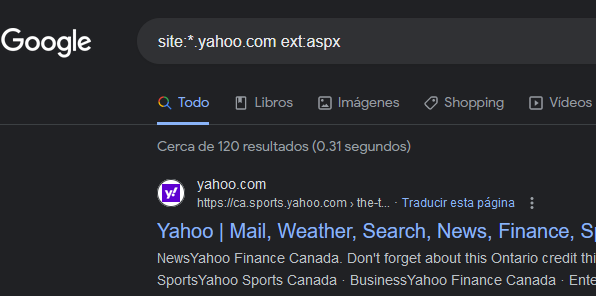
Google Search is a great tool for finding injection points that are hidden or completely missed while browsing a site. It’s very easy; I’ll show you the ones I usually use:
site:*.yahoo.com ext:php
site:*.yahoo.com inurl:php -www
site:*.yahoo.com ext:asp
site:*.yahoo.com inurl:aspx
site:*.yahoo.com inurl:jsp
site:*.yahoo.com inurl:cat=
site:*.yahoo.com inurl:id=
You can make as many variations as you want; it’s just a matter of adding a little imagination and knowing how the site is developed.
Wayback Machine
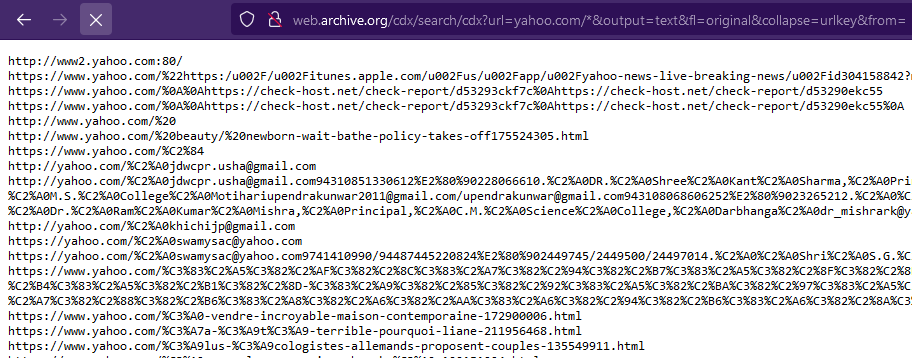
Another extremely useful tool for finding hidden or hard-to-find injection points is Wayback Machine. All you have to do is use a URL crafted to return the desired results.
http://web.archive.org/cdx/search/cdx?url=yahoo.com/*&output=text&fl=original&collapse=urlkey&from=This returns as many results as are registered in Wayback Machine. The next step would be to filter using the browser’s search function.
Hidden parameters
This suggestion is a bonus in this post and has helped me on numerous occasions to find hidden parameters.
When I browse a website and see pages with PHP, JSP, ASP, ASPX, etc. extensions, I start experimenting with the URI parameters, either those displayed visually on the page or those I discover using a tool designed to detect parameters used by that same page.
Arjun is a tool developed by Somdev Sangwan that allows you to know if there are usable parameters of the type GET, POST, JSON and XML.
arjun -u https://api.example.com/endpoint -m GETConclusion
This is how I go about finding XSS vulnerabilities; there are probably other methods that work more effectively and even some that I’ve missed, but the goal is to show what has been useful to me and what might work for you too.
“If you help others online, they will help you too.”
— Johan Manuel Mendez